Appendix B: Legacy TelemFFB Documentation
Effects Documentation (Legacy)
This section attempts to document and explain each of the effects and their settings. It is a work in progress.
A majority of the effects will apply to both DCS and MSFS. Where applicable, each effect setting has a comment in-line with the default setting to indicate which simulator(s) it applies to.
Generic Aircraft Effects (applies to all (or multiple) aircraft types)
G-Force Loading Effect
Only applies to fixed-wing aircraft
DCS Only (MSFS has built in G forces in the TelemFFB stick force implementation)
The G-Force loading effect simulates the increasing force that is required to pull back on the stick as the g forces increase during a dive pull-out or hard turn.

-
gforce_effect_enable (yes/no)
- enable or disable the effect
-
gforce_min_gs (1.0 or greater)
- the g loading where the effect will start playing
-
gforce_max_gs (greater than gforce_min_gs)
- g loading where the strength will reach > ‘gforce_effect_max_intensity’
-
gforce_effect_max_intensity (0.0-1.0 or 0%-100%)
- the maximum force applied in relationship to the constant force > slider in VPforce configurator
-
gforce_effect_curvature (1.0 or greater)
-
affects the onset characteristics of the force effect. A value > of 1.0 is a linear increase in force across the defined g > range. Increasing the curvature value will result in a flatter > increase at the beginning of the range followed by an ever > increasing force as the effect approaches the top of the > range.
-
Example values (default is 2.2)
-
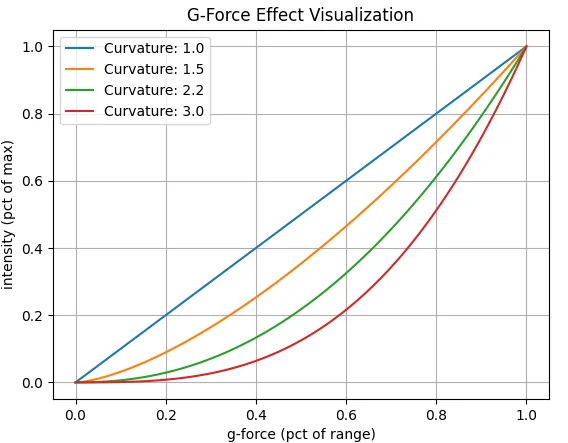
-
Deceleration Effect
Monitors the deceleration g-forces on the aircraft and, if the aircraft is on the ground will apply a forward force (away from pilot) equal to the deceleration G force up to, but not exceeding ‘deceleration_max_force’.
-
deceleration_effect_enabled (yes/no, on/off, 1/0)
- Enable/disable the effect
-
deceleration_max_force (0.0-1.0)
- Controls the maximum force that can be applied
Damage Effect (DCS)
Plays a short random direction, random intensity bump each time damage is detected on the aircraft.
** Can potentially cause performance impact due to large number of calculations required in export script for some aircraft ** Written in a way that will only execute the code in the export script if the feature is enabled in TelemFFB.
-
damage_effect_enabled (yes/no, 1/0)
- Controls whether the effect is enabled (both in TelemFFB and the > calculations in TelemFFB.lua export script)
-
damage_effect_intensity (0.0-1.0, %0-%100)
- Controls the intensity of the generated effects. Note that with > the randomized nature of the intensity, some hits will be > lower and some higher than the defined value
Damage Effect (IL-2)
Plays a short random direction, random intensity bump each time damage is detected on the aircraft.
-
damage_effect_intensity (0.0-1.0, %0-%100)
- Controls the intensity of the generated effects. Note that with > the randomized nature of the intensity, some hits will be > lower and some higher than the defined value
AoA Buffeting
Runway Rumble/Touchdown
Weapons and Countermeasure deployment
Speedbrake Motion and Buffeting
Gear Motion and Buffeting
Flaps Motion
Canopy Motion
Spoiler Motion and Buffeting
Propeller Aircraft Specific Effects
Engine Rumble
Jet Aircraft Specific Effects
After Burner Rumble
Jet Engine Rumble
AoA Reduction Effect
Simulates the increased forward stick pressure that is applied on some fighter aircraft when a critical angle of attack is exceeded. The effect will monitor the AoA and apply a linear force, up to the maximum defined value starting at the ‘start’ AoA and maxing out at the ‘max’ AoA.
-
aoa_reduction_effect_enabled (yes/no, 1/0)
-
aoa_reduction_max_force (0.0-1.0, %0-%100)
-
critical_aoa_start (AoA in degrees)
-
critical_aoa_max (AoA in degrees)
Helicopter Specific Effects
ETL Transition and Overspeed Shake
Helicopter Rotor/Engine Rumble
Turboprop Specific Effects (MSFS)
None as of yet