1. Quick Start
This walkthrough takes you from download to feeling your first effects. Each step links to the page with full detail.
1.1 Install TelemFFB
Download the latest release zip from the GitHub Releases page and extract it where you want the application to live. There is no installer - run TelemFFB.exe from the extracted folder.
Note
If your antivirus flags the executable, see TelemFFB and Antivirus Software. This is a known false-positive pattern with PyInstaller-packaged applications.
1.2 First launch: System Settings
The first time you start TelemFFB, the System Settings window opens automatically.
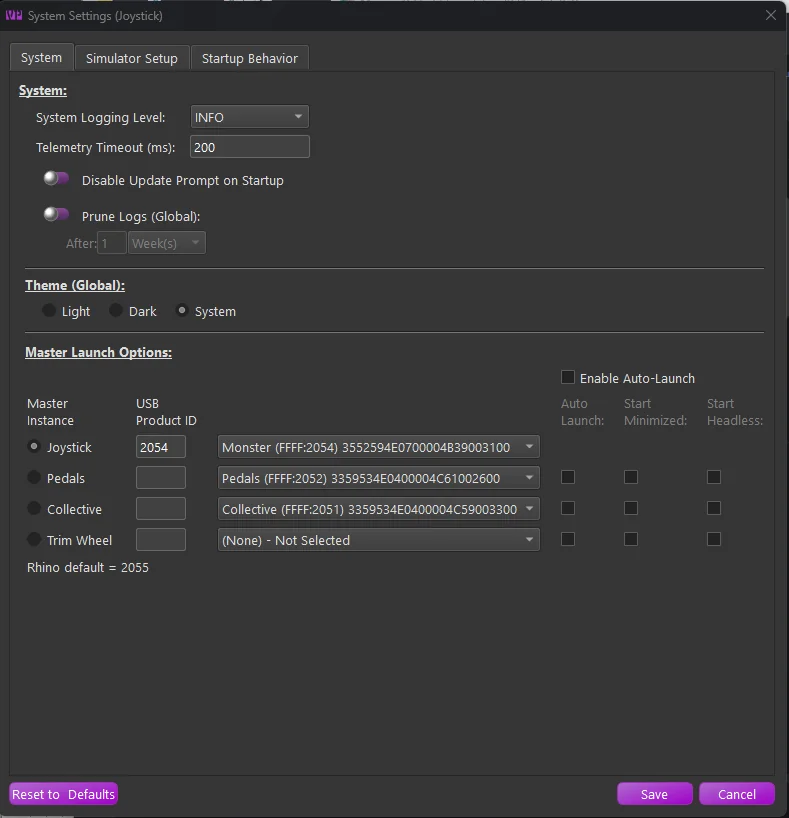
- On the Launch Options page, verify your devices. TelemFFB auto-assigns connected VPforce devices by their names (Joystick, Pedals, Collective) - the selector pulldowns should already show each device in its role. If you have more than one device, enable auto-launch so the additional instances start automatically - see Devices & Instances.
- On the Sim Setup page, enable each simulator you fly and let the auto-setup features install the required export scripts or plugins - see Connecting Your Simulator.
Save the settings. TelemFFB connects to your device and sits ready for telemetry.
1.3 Fly
Start your simulator and load a flight. TelemFFB detects the aircraft from the telemetry, matches it to a profile, and applies the settings automatically. Many aircraft ship with tuned default profiles; anything unmatched gets sensible defaults for its aircraft class.
Verify it is working:
- The status icon shows Running when telemetry is flowing (the system tray icon turns green too).
- The Current Aircraft and Matched Model fields show what TelemFFB detected.
- The Monitor tab shows live telemetry values and the effects currently playing.
See the UI Overview for what everything on the main window means.
1.4 Tune
Open the Settings tab while flying. Every change applies immediately - no restart, no save-and-reload:
- Slider handles turn green while their effect is actively playing, so you can see what you are feeling.
- Toggle an effect off and on to isolate it.
- Made a mess? Click the x icon next to any modified setting to return it to the default. See How Settings Work.
1.5 Go deeper
- MSFS or X-Plane: TelemFFB provides your entire force feedback implementation - spring forces, trim, autopilot. Read the MSFS & X-Plane guide next; it is the most important page for these sims.
- DCS: the sim provides native FFB; TelemFFB layers additional effects on top. The DCS guide explains how the two interact.
- IL-2: enable the shake-master settings to replace IL-2’s basic shakes with configurable ones - see the IL-2 guide.
- Browse the Effects Reference to see everything you can enable.